Why aliases matter for your workflow
Translated from the Portuguese original.Read the original
In this article
The goal of this article is to give an overview of what aliases are, why they matter for our workflow, when it's the right time to create them, how to create them and a few personal examples.
What are aliases?
You can think of aliases as a text interface for commands in the terminal (or shell), which you can use to map long, repetitive or complex commands.
To check which aliases are already available on your machine, open the terminal and type the alias command.
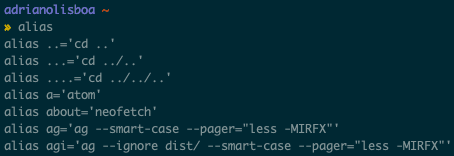
Image 1: List of aliases after typing and running the alias command in the terminal.
Why do they matter?
Aliases matter because they save time during development. With them, we can automate repetitive tasks or run long commands using shortcuts.
When should you create one?
Imagine you've just joined a new project and you notice that every day you're running the same commands for a specific task (for example: navigating through several directories to get to your project directory) several times a day.
Maybe you spend a few minutes digging through your terminal history for the right command, or maybe you end up forgetting some commands, or maybe you want to automate some tasks for your teammates, and so on.
If any of the scenarios above sound familiar, it might be time to think about creating some aliases.
A good way to find out which commands you keep repeating in your day to day is to type history in your terminal or open the .bash_history file in your home directory, where every command you run is stored. To see the 15 commands you've repeated most, type this in your terminal (you need awk installed on your machine):
history | awk '{a[$2]++}END{for(i in a){print a[i] " " i}}' | sort -rn | head -n 15 (in case you're wondering... yes, the command above has been automated).

Image 2: List of the most-run commands, filtered from the history command.
As you can see in the image above, the ls command was run 3492 times on this computer, followed by the gst command, which is an alias that expands to git status when it runs.
How do you create one?
Creating aliases is pretty simple. Just write a line starting with alias, followed by the name you want to give your alias, and assign a command to it.
For example, imagine you use a specific git command to show formatted logs. You could type the following command in your terminal:
alias glog='git log --pretty=format:"%h %s" --graph'
With that, when you type glog in your terminal, it actually runs git log --pretty=format:"%h %s" --graph.
However, when you close your current terminal session, the alias you just created would be lost. For it to load every time you open the terminal, you need to add it to a file that loads with the session (for example, .bash_profile).
Try adding that line to the end of the file, closing your terminal and opening it again to see if the new alias still works.
A tip is to keep your aliases as a project in a directory and split them by context. You can check out an example of my bash setup and my aliases.
Conclusion
In my day to day as a software developer, I use aliases all the time and they save me several minutes. However, you need to be careful not to fall into the trap of wanting to automate everything. Some tasks run so rarely that they may not even be worth the effort of creating aliases for them.
I suggest you check which commands you use the most and think about whether it makes sense to create aliases for them.