Prompt: landing page on Kimi K3.1 Pro (test against Claude)
The prompt I used to build the same landing page on Kimi K3.1 Pro and Claude Opus 5.5, with both finished pages ready to open and the cost of each.
- Claude
Translated from the Portuguese original.Read the original
In this prompt
⚙️ How to use this prompt
- Open Kimi and pick the K3.1 Pro model
- Paste the prompt below into a new chat
- Copy the code from the answer, save it in a file called
index.htmland open it in your browser
If the chat says it is full, you can use the Kimi API, which charges per use. That is how I ran the test.
⬇️ Prompt ⬇️
Create a single-page landing page, in HTML, CSS and JavaScript in one file, for a Brazilian specialty coffee brand called "Serra Alta". I want an opening section with a 3D coffee bag made in CSS that spins as the person scrolls the page, three product sections with prices in reais, testimonials and a footer. Modern look, warm colors, smooth animations on scroll. Deliver the complete code.
🔍 The test result
I ran the same prompt on both models on 11/03/2026: on Kimi K3.1 Pro through the API, and on Claude Opus 5.5 inside Claude Code. Neither got a follow-up request for changes. Both pages are here, exactly as they came out:
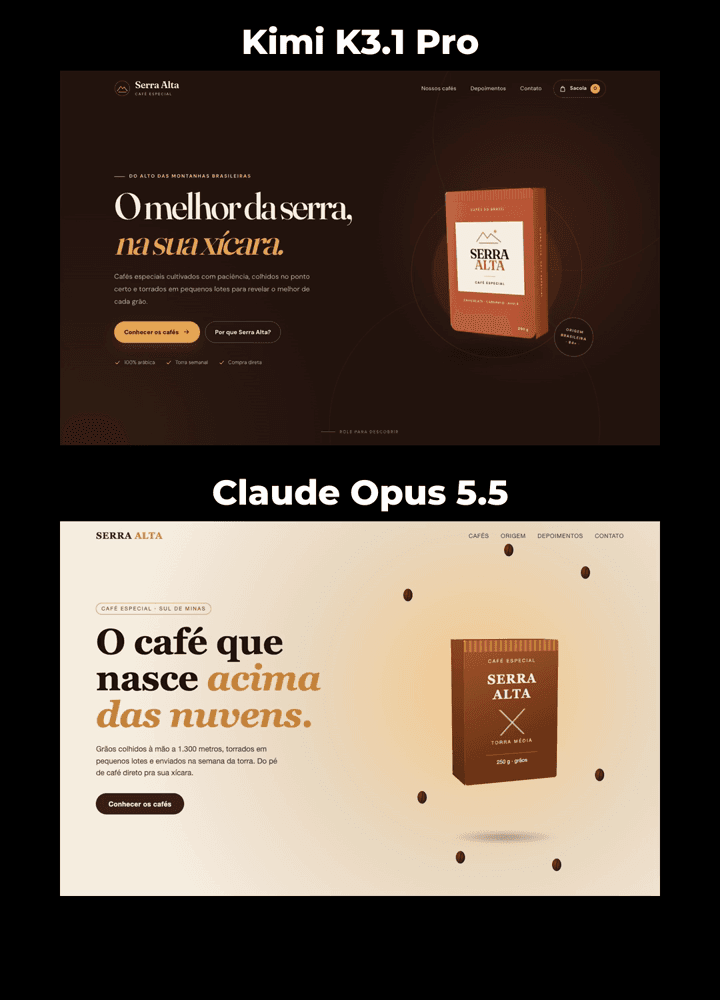
I liked the Kimi one better. The price was a surprise, in the other direction:
| Kimi K3.1 Pro | Claude Opus 5.5 | |
|---|---|---|
| Price per million tokens (input / output) | US$ 2 / US$ 10 | US$ 4 / US$ 20 |
| Tokens it wrote | 26,816 (9,158 just thinking) | about 4,400 |
| Cost of this page | US$ 0.27 | about US$ 0.09 |
A Kimi token costs half as much, but it wrote six times more, and this page came out more expensive. The Kimi cost comes from the API bill; the Claude one is estimated from the size of the page, because I did not run it through the API.
🔗 Links from the video
- Official Kimi K3.1 Pro launch post, from 10/23/2026. Moonshot promised to release the full model for download on 11/4/2026.
- Launch video
- Kimi K3.1 Pro tech blog, with the coding test (Terminal-Bench 4.0): Kimi K3.1 Pro at 65.7, GPT-6 Astra at 58.2 and Claude Opus 5.5 at 66.4, according to Moonshot itself.
- Code Arena website ranking, voted by people: Kimi K3.1 Pro was 9th in the 10/27/2026 update.
- Kimi API prices and Claude API prices
- Claude plans: Max costs US$ 100 a month in the US and R$ 550 in Brazil.